Outboundry allows you to import leads directly from your LinkedIn Recruiter / Recruiter Lite search results and instantly use them in your outreach campaigns.
This enables recruiting teams, staffing agencies, and outbound teams to convert high-quality Recruiter searches into scalable outreach campaigns without manual exports.
Before you begin, make sure:
You have an active LinkedIn Recruiter or Recruiter Lite account.
Your LinkedIn account is already connected to Outboundry.
You have an active Recruiter search ready with filters applied.
Log in to your LinkedIn account.
Navigate to LinkedIn Recruiter or Recruiter Lite.
Go to the Search page.
Apply your desired filters such as:
Job title
Location
Skills
Experience
Company
Industry
Availability
LinkedIn Search Results
Once your search results are ready:
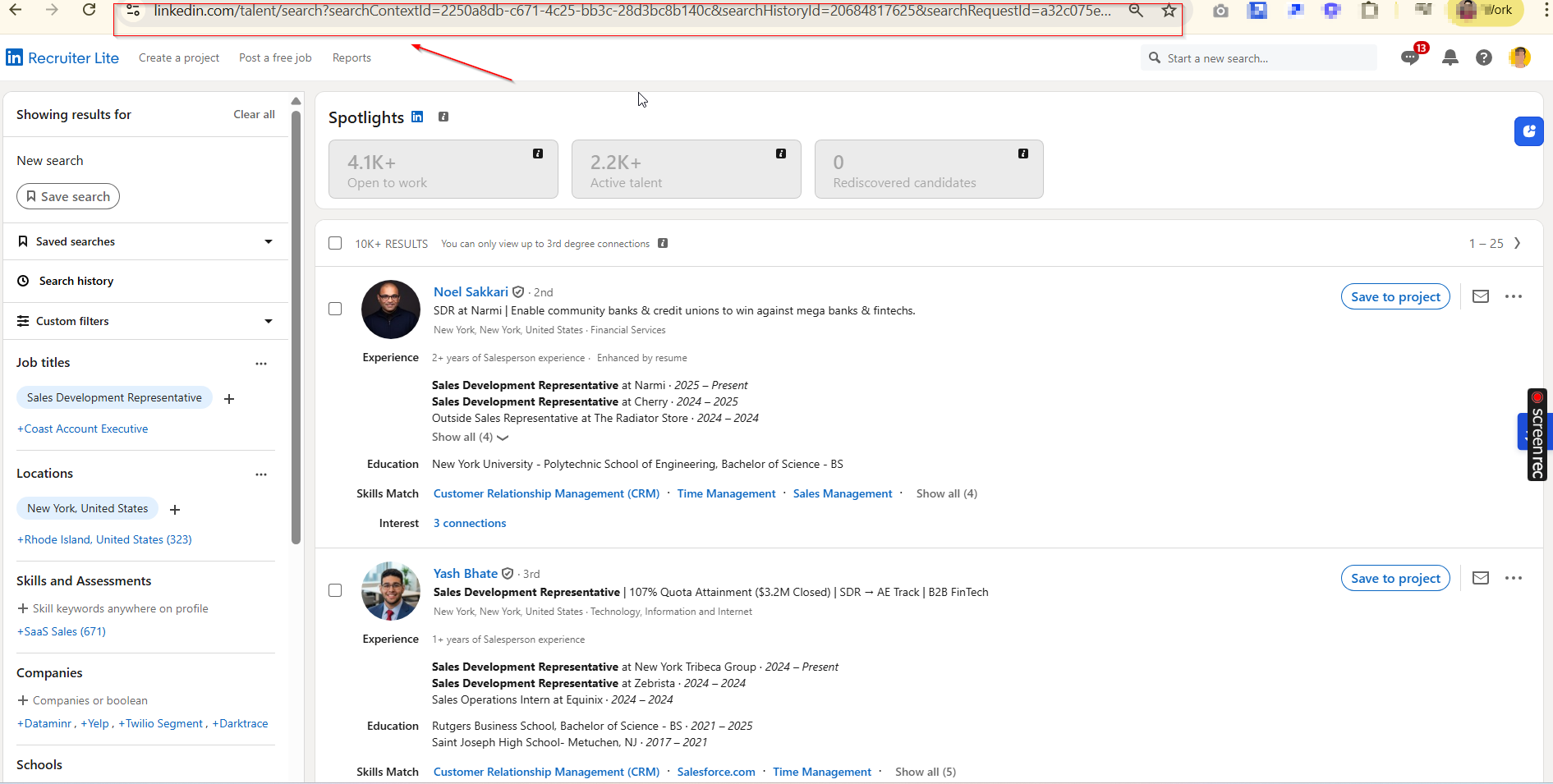
Look at the browser address bar.
Copy the full URL of the Recruiter search page.
Example format:
https://www.linkedin.com/talent/search?searchContextId=...
👉 Important:
Make sure the URL starts with linkedin.com/talent/search.
Copy the full URL exactly as shown in the browser.
Log in to your Outboundry dashboard.
Go to Campaigns.
Open an existing campaign or create a new one.
Click Add Leads → Select Import from LinkedIn Recruiter Search.
Paste the copied Recruiter search URL.
Click Import Leads.
Outboundry will automatically start fetching leads from your Recruiter search results.
After the import completes:
All imported profiles will appear in your campaign’s Leads tab.
Outboundry automatically captures:
Full name
LinkedIn profile URL
Current role
Company
Location
Headline (if available)
You can now:
Assign these leads to sequences
Personalize outreach
Start automation
Outboundry automatically scrolls through multiple pages of Recruiter results and imports leads safely.
Tip: Narrow down filters to improve targeting and reduce unnecessary imports.
LinkedIn enforces usage limits. Large imports may take time and are processed gradually to maintain account safety.
Outboundry automatically prevents duplicate leads across campaigns and workspaces.
This import method supports:
✅ LinkedIn Recruiter
✅ LinkedIn Recruiter Lite
If you're using standard LinkedIn or Sales Navigator, use the respective import options.
Ensure the copied URL is from the Recruiter search page.
Confirm you are logged into LinkedIn in the same browser.
Refresh Outboundry and retry.
Verify that the search contains visible results.
Some profiles may be restricted based on Recruiter permissions.
Try importing a smaller search first.
Reconnect your LinkedIn account in Outboundry.
Make sure LinkedIn session is active.
If you encounter any issues while importing from Recruiter search, reach out via in-app chat or contact our support team. We’re happy to help you get started 🚀