Outboundry allows you to import leads directly from the people who have reacted to a LinkedIn post. This helps you target highly engaged prospects who have already shown interest in a topic, product, or brand.
Instead of cold outreach, you can now run warm outreach campaigns based on real engagement signals.
Before you begin, make sure:
You are logged into your LinkedIn account.
Your LinkedIn account is connected to Outboundry.
You have access to the LinkedIn post whose reactions you want to import.
You are logged into LinkedIn in the same browser session as Outboundry.
Log in to LinkedIn.
Navigate to the post you want to extract reactions from.
This can be:
A personal profile post
A company page post
A group post
A sponsored or organic post (if visible)
Make sure the post loads completely.
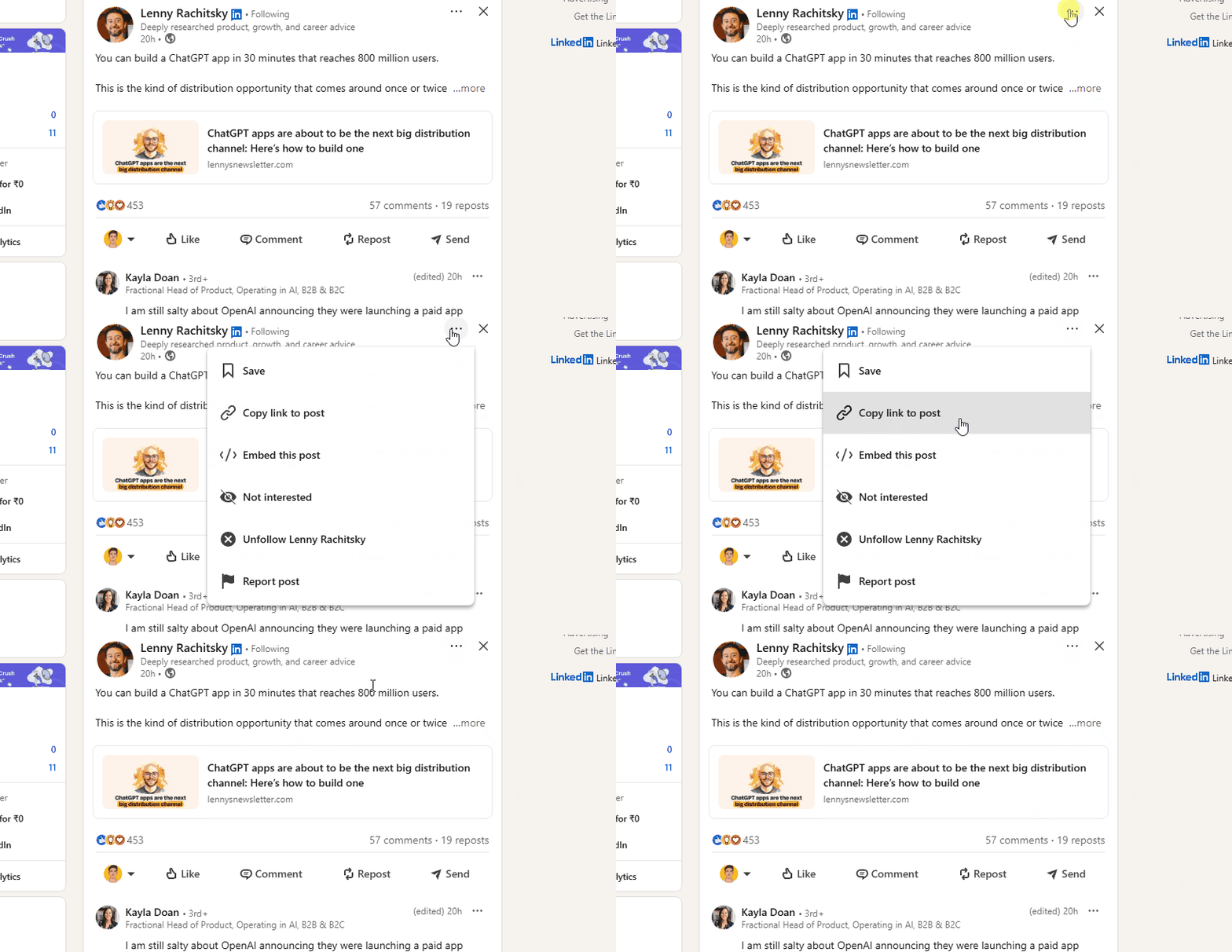
Click the three-dot menu (⋯) on the top-right corner of the post.
Select Copy link to post.
The post URL will be copied to your clipboard.
Example format:
https://www.linkedin.com/posts/username_post-id
Log in to your Outboundry dashboard.
Go to Campaigns.
Open an existing campaign or create a new one.
Click Add Leads → Select Import from LinkedIn Post Reactions.
Paste the copied LinkedIn post URL.
Click Import Leads.
Outboundry will automatically fetch all profiles that reacted to the post.
Once the import completes:
All imported profiles will appear in the campaign’s Leads tab.
Outboundry automatically captures:
Full name
LinkedIn profile URL
Profile photo
Headline
Current company
Location (if available)
You can immediately:
Add these leads to outreach sequences
Personalize messages
Start LinkedIn or multi-channel campaigns
This strategy helps you:
✅ Target people already interested in a topic
✅ Increase reply rates with contextual outreach
✅ Personalize messages based on post engagement
✅ Reduce cold outreach fatigue
✅ Build warmer prospect lists quickly
Example message personalization:
“Saw you reacted to [Post Topic] — thought this might be relevant for you…”
You can only import users whose reactions are visible to your LinkedIn account. Private or restricted profiles may not be accessible.
Outboundry captures all reaction types including:
👍 Like
👏 Celebrate
❤️ Love
💡 Insightful
😂 Funny
🎉 Support
Posts with hundreds or thousands of reactions may take longer to import. Outboundry processes imports safely to avoid LinkedIn restrictions.
Outboundry automatically avoids importing duplicate leads that already exist in your workspace or campaigns.
Outreach actions follow safe automation limits to protect your LinkedIn account.
Ensure the URL is copied correctly from the LinkedIn post.
Make sure you're logged into LinkedIn in the same browser session.
Refresh Outboundry and try again.
Some profiles may be private or restricted.
LinkedIn may limit visibility based on your network degree.
Reconnect your LinkedIn account.
Try importing a smaller post first.
If you need help importing leads from LinkedIn post reactions, reach out via in-app chat or contact our support team. We’re happy to help you scale your outreach 🚀